1.3 Installing Java
Key terms: virtual machine, Java virtual machine, source file, class file, bytecode, Java Runtime Environment (JRE), Java Development Kit (JDK), Integrated Development Environment (IDE)
This section describes how to install the (free) software needed to write and run Java programs. Even if you already have the software installed, you need to understand the concepts and terminology introduced here.
1.3.1 The Java Virtual Machine
A virtual machine (VM) is an application that provides a simulated environment for running other programs. There are two kinds: system VMs and process VMs.
A system VM imitates an entire operating system. For example, if your computer runs Windows but you want to use software written only for Linux, you can run a Linux VM that behaves as though it were a separate computer. The VM presents the illusion of a particular hardware and operating system environment, even if the underlying hardware is entirely different.
A process VM provides a complete virtual computing system with its own virtual CPU and machine language. Its purpose is to hide the physical details of real machines and offer a standard execution environment for programs compiled into its virtual instruction set.
The Java Virtual Machine (JVM) is a process VM that defines the Java language in a machine-independent way. The Java compiler translates source files (plain text files containing source code) into class files containing bytecode — machine instructions for the JVM. At runtime, the JVM translates each bytecode instruction into one or more host-machine instructions. In practice, it may compile frequently executed sections of code to avoid repeated translation for improved performance.
This approach yields two important practical benefits:
-
Portability: developers do not have to compile programs separately for each supported CPU and operating system. Responsibility for platform-specific details shifts to JVM implementers.
-
Consistency: the JVM provides a standard execution environment that reduces behavioral differences across hardware and operating systems.
The JVM also provides an important layer of security. When a Java program runs, it cannot directly access system resources such as memory or the disk. Instead, it operates within a protected sandbox, and all requests for system access are mediated by the JVM according to a security policy that can be customized by the user. This policy can, for example, restrict file access to explicitly authorized files. The JVM also ensures that a program cannot access memory outside its permitted range.
1.3.2 The Java Development Kit
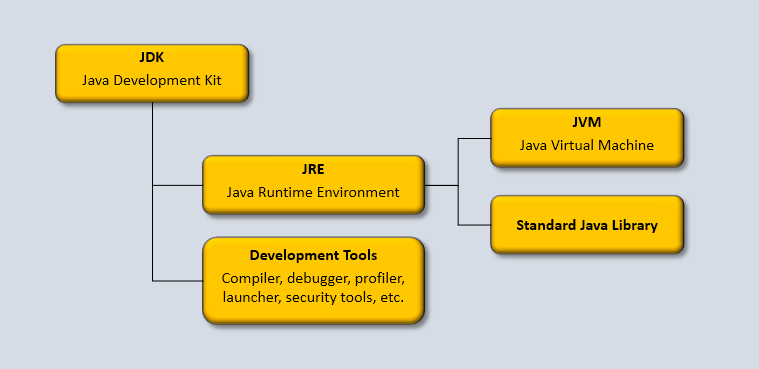
To run Java programs on your computer, you need the Java Runtime Environment (JRE). This consists of the JVM and the standard Java library, a large collection of classes available to every Java application. The standard library is discussed in the next section.
To write your own Java programs, you must install the Java Development Kit (JDK), which includes the JRE and development tools such as a compiler, debugger (for locating errors), profiler (for monitoring performance), security tools, and deployment tools for distributing applications.
Figure 1.3.2: The Java Development Kit
Download the latest version: https://www.oracle.com/java/technologies/downloads/
1.3.3 Integrated Development Environments
In principle, you could write programs in a plain text editor and use JDK tools to compile and run them. In practice, programmers rely on productivity tools that streamline development. At a minimum, you would want a language-aware text editor for writing source code. Such editors typically provide syntax highlighting (color coding of language elements), code completion (suggesting ways to complete partially typed code), and auto-formatting to enforce standard indentation and spacing.
Most software development, however, is done in an Integrated Development Environment (IDE). An IDE combines an intelligent editor with tools for writing, testing, debugging, profiling, and deploying software within a single workspace. Professional IDEs also support collaboration, project management, and version control.
Modern IDEs increasingly incorporate AI-assisted coding, offering suggestions, autocompletion, error detection, and other forms of assistance that are rapidly reshaping how programmers work.
Several professional-grade IDEs are available for Java development. IntelliJ IDEA provides a full-featured environment for Java and Android development and also forms the basis of Android Studio. Open-source alternatives include NetBeans and Eclipse, both of which support development in multiple languages and integrate fully with the JDK.
A number of free online IDEs (web IDEs) run in a browser without installation. They offer instant setup, collaboration features, and increasingly AI-assisted coding. While convenient for learning and rapid experimentation, they remain less capable than professional desktop IDEs for large or complex projects.