6.4 Nested Loops
Key terms: nested loop
6.4.1 Basic Concepts
A nested loop is one contained in the body of another loop. One common use of such a structure
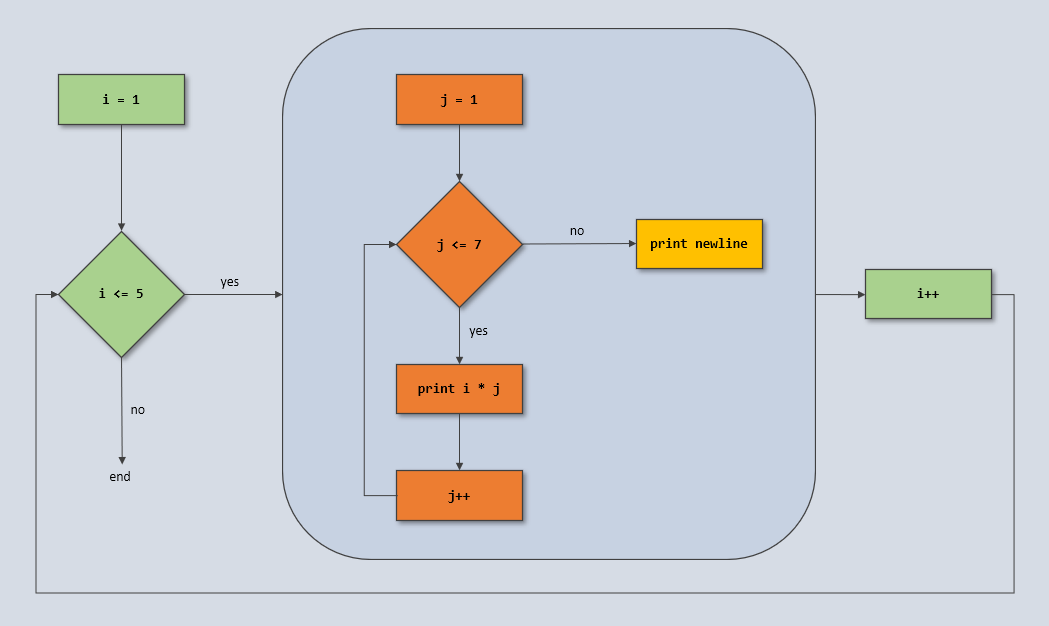
is to output tabular data. The code below outputs a 5 x 7 multiplication table. The outer loop
control variable (i) ranges from 1 to 5. For each value of i, the inner loop control variable
(j) ranges from 1 to 7, printing the product of i and j at each step. The second call to
println is part of the outer loop body — it outputs a newline character at the end of each row of
the table. This process is depicted by the flowchart in Figure 6.4.1.
for (int i = 1; i <= 5; i++) {
    for (int j = 1; j <= 7; j++) {
        System.out.printf("%3d", i * j);
    }
    System.out.println();
}
Output
1  2  3  4  5  6  7
2  4  6  8 10 12 14
3  6  9 12 15 18 21
4  8 12 16 20 24 28
5 10 15 20 25 30 35
Figure 6.4.1: Flowchart
6.4.2 Case Study: Winning Combinations
The simplicity of the Sum Game made it ideal for introducing the concept of a Monte Carlo simulation in Section 6.3.1. However, the probability can be calculated directly and exactly by enumerating all three-die combinations and counting those that satisfy the winning criterion. Listing 6.4.2 performs this task using three nested loops, each iterating over the possible values of one die.
Listing 6.4.2 - SumGame.java
package chap06.sect4;

/**
 * Calculates the exact rounded probability of winning the Sum Game. In this game, the player rolls
 * three dice and wins if one of the rolled numbers equals the sum of the other two.
 *
 * @author Drue Coles
 */
public class SumGame {

   public static void main(String[] args) {
      System.out.println("Calculating the probability of winning the Sum Game...");
      final int sides = 6;
      int winningRolls = 0;
      for (int d1 = 1; d1 <= sides; d1++) {
         for (int d2 = 1; d2 <= sides; d2++) {
            for (int d3 = 1; d3 <= sides; d3++) {
               if (d1 == d2 + d3 || d2 == d1 + d3 || d3 == d1 + d2) {
                  winningRolls++;
               }
            }
         }
      }

      final int totalRolls = sides * sides * sides;
      double probability = (double) winningRolls / totalRolls;
      System.out.printf("Number of winning rolls: %d %n", winningRolls);
      System.out.printf("Number of possible rolls: %d %n", totalRolls);
      System.out.printf("Probability of winning: %.4f %n", probability);
   }
}
Output 6.4.2
Calculating the probability of winning the Sum Game...
Number of winning rolls: 45
Number of possible rolls: 216
Probability of winning: 0.2083
For a visual trace of the nested looping, the program could be modified to output each three-die combination as it occurs:
for (int d3 = 1; d3 <= sides; d3++) {
    System.out.printf("%n %d-%d-%d", d1, d2, d3); // output current combination
    if (d1 == d2 + d3 || d2 == d1 + d3 || d3 == d1 + d2) {
        winningRolls++;
        System.out.println(" ★"); // mark winning combination
    }
}
Partial Output of Code Fragment
1-1-1
1-1-2 ★
1-1-3
1-1-4
1-1-5
1-1-6
1-2-1 ★
1-2-2
1-2-3 ★
1-2-4
6.4.3 Case Study: Drawing a Checkerboard
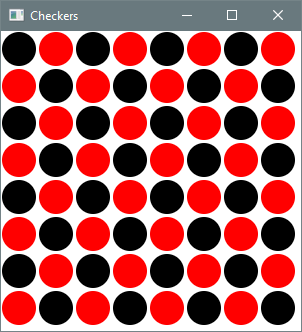
The graphics application in Listing 6.4.3 uses nested loops to draw a board filled with alternating red and black checkers. The outer loop repeats once for each row of the board. Within a row, the inner loop repeats once for each column. Each (row, column) combination is checked to determine the correct color of the corresponding checker.
Listing 6.4.3 - Checkers.java
package chap06.sect4;

import javafx.application.Application;
import javafx.scene.Scene;
import javafx.scene.layout.Pane;
import javafx.scene.paint.Color;
import javafx.scene.shape.Circle;
import javafx.stage.Stage;

/**
 * Draws a grid of black and red checkers.
 *
 * @author Drue Coles
 */
public class Checkers extends Application {

    @Override
    public void start(Stage stage) {
        final int size = 300;

        final int numRows = 8;
        final int numCols = 8;
        final int diameter = size / numRows;
        final int radius = diameter / 2;

        Pane root = new Pane();
        Scene scene = new Scene(root, size, size);

        for (int row = 0; row < numRows; row++) {
            for (int col = 0; col < numCols; col++) {
                // pixel coordinates of circle in position (row, col)
                int x = radius + col * diameter;
                int y = radius + row * diameter;

                Color color = (row % 2 == col % 2 ? Color.BLACK : Color.RED);
                Circle circle = new Circle(x, y, radius - 1, color);
                root.getChildren().add(circle);
            }
        }

        stage.setTitle("Checkers");
        stage.setScene(scene);
        stage.show();
    }

    public static void main(String[] args) {
        launch(args);
    }
}
Output 6.4.3