6.2 for Loops
Key terms: loop control variable
6.2.1 Syntax and Semantics
The following code uses a while loop to output a sequence of 20 asterisks. The variable i is
a loop control variable: it is initialized before the loop, tested as a condition for
executing the body, and updated after each iteration.
int i = 0;
while (i < 20) {
   System.out.print("*");
   i++;
}
Not all loops use a loop control variable. For example, the loop in the GamblersRuin program from
the previous section continues while the gambler's balance is greater than zero, and the balance
fluctuates unpredictably. However, when a loop control variable is used, the code follows a
regular pattern: initialization, condition check, and update.
A for loop enables these three components to be written in a single compact statement. The
previous example can be rewritten as:
for (int i = 0; i < 20; i++) {
    System.out.print("*");
}
The general syntax of a for loop is:
for (S1; E; S2) {
   // conditionally executed code
}
true then the body is executed, otherwise execution continues after the loop.
After each iteration, the update step (S2) is executed and the cycle repeats with another
evaluation of E.
Listing 6.2.1a revises the Summer program from the previous section using a for loop instead of
a while loop.
Listing 6.2.1a - Summer.java
package chap06.sect2;

import java.util.Scanner;

/**
 * Calculates the sum of consecutive positive integers up to a user-specified limit.
 *
 * @author Drue Coles
 */
public class Summer {

   public static void main(String[] args) {

      System.out.print("Enter a positive integer: ");
      Scanner in = new Scanner(System.in);
      final int limit = in.nextInt();

      int sum = 0;
      for (int next = 1; next <= limit; next++) {
         sum += next;
      }

      System.out.printf("1 + 2 + 3 + ... + %,d = %,d %n", limit, sum);
   }
}
Listing 6.2.1b presents a more substantial application. It approximates π using partial sums of an infinite series familiar to students of calculus.
Listing 6.2.1b - PiApproximator.java
package chap06.sect2;

/**
 * Approximates π using the Leibniz series: π = 4 - 4/3 + 4/5 - 4/7 + 4/9 - ...
 *
 * @author Drue Coles
 */
public class PiApproximator {

    public static void main(String[] args) {
        final int n = 100_000_000; // number of terms of the series to add
        double piApprox = 0.0; // sum of terms
        int denominator = 1; // denominator of current term
        int sign = 1;  // sign of current term

        // compute the n-th partial sum (the sum of the first n terms)
        for (int i = 0; i < n; i++) {
            piApprox += sign * 4.0 / denominator; // add next term
            denominator += 2;
            sign = -sign;
        }

        // A double-precision floating-point number has about 16 decimal digits of precision, but
        // the last digit may be unreliable due to binary rounding, so 15 is specified.
        String label1 = String.format("Leibniz series approximation (%,d terms)", n);
        String label2 = "Double-precision floating-point value nearest to π";
        System.out.printf("%50s: %.15f %n", label1, piApprox);
        System.out.printf("%50s: %.15f %n", label2, Math.PI);
    }
}
Output 6.2.1b
  Leibniz series approximation (100,000,000 terms): 3.141592643589326
Double-precision floating-point value nearest to π: 3.141592653589793
6.2.2 Case Study: Game of Craps
Craps is a traditional single-player dice game that is still played in casinos. In fact, it offers the player the highest probability of winning among all common casino games. That probability is less than 50%, but it is close (as will be seen in Section 6.3).
Chapter 5 presented a program that simulates the first roll of the game. Listing 6.2.2 simulates the game in its entirety. The rules are described in the class documentation.
Listing 6.2.2 - Craps.java
package chap06.sect2;

import java.util.concurrent.ThreadLocalRandom;

/**
 * Plays the game of Craps. The player rolls two dice. There are three possibilities for the
 * come-out roll:
 *    1. Natural (7 or 11) - player wins.
 *    2. Craps (2, 3, or 12) - player loses.
 *    3. In any other case, the player continues rolling until:
 *       a. Rolling the original sum (the point) - player wins.
 *       b. Rolling a 7 (seven out) - player loses.
 *
 * @author Drue Coles
 */
public class Craps {

   public static void main(String[] args) {
      // come-out roll
      ThreadLocalRandom rand = ThreadLocalRandom.current();
      int die1 = rand.nextInt(1, 7);
      int die2 = rand.nextInt(1, 7);
      final int comeOutRoll = die1 + die2;
      System.out.printf("%d + %d = %d %n", die1, die2, comeOutRoll);

      // check if player wins or loses on come-out roll
      if (comeOutRoll == 7 || comeOutRoll == 11) {
         System.out.println("Natural. You win.");
         return;
      }
      if (comeOutRoll == 2 || comeOutRoll == 3 || comeOutRoll == 12) {
         System.out.println("Craps. You lose.");
         return;
      }

      System.out.printf("The point is %d. %n", comeOutRoll);

      int roll = 0; // ensures loop executes at least once

      // keep rolling until player matches point or rolls seven
      while (roll != comeOutRoll && roll != 7) {
         die1 = rand.nextInt(1, 7);
         die2 = rand.nextInt(1, 7);
         roll = die1 + die2;
         System.out.printf("%d + %d = %d %n", die1, die2, roll);
      }

      if (roll == comeOutRoll) {
         System.out.println("You rolled the point. You win.");
      } else {
         System.out.println("Seven out. You lose.");
      }
   }
}
Output 6.2.2a
2 + 5 = 7
Natural. You win.
Output 6.2.2b
1 + 2 = 3
Craps. You lose.
Output 6.2.2c
3 + 2 = 5
The point is 5.
1 + 5 = 6
3 + 1 = 4
4 + 6 = 10
4 + 1 = 5
You rolled the point. You win.
Output 6.2.2d
5 + 5 = 10
The point is 10.
3 + 1 = 4
1 + 5 = 6
2 + 2 = 4
4 + 1 = 5
1 + 6 = 7
Seven out. You lose.
6.2.3 Case Study: Fractal Generator
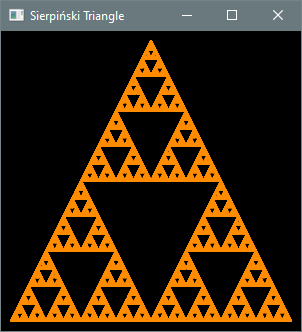
A Sierpiński triangle is a fractal that can be constructed in the following way: Start with an equilateral triangle. Partition it into four smaller congruent equilateral triangles and remove the one in the center. Repeat this process for each of the remaining triangles, continuing indefinitely.
Figure 6.2.3: First Five Steps of the Construction

Remarkably, the same result can be obtained using randomness in a way that is much easier to program. Start by fixing three corners of a triangle, then repeat the following steps:
- Choose a random corner.
- Move halfway from the current point toward that corner.
- Draw a dot at the new location.
You would probably not expect anything other than an unstructured smear of dots to arise from this process, but after many repetitions the intricate structure of a Sierpiński triangle begins to emerge.
Listing 6.2.3 is a JavaFX application that performs these steps to draw the fractal. This application is a bit longer and more involved than earlier ones, but the documentation clarifies the logic.
Listing 6.2.3 - Fractal.java
package chap06.sect2;

import javafx.application.Application;
import javafx.geometry.Point2D;
import javafx.scene.Scene;
import javafx.scene.layout.Pane;
import javafx.scene.paint.Color;
import javafx.scene.shape.Circle;
import javafx.stage.Stage;

import java.util.concurrent.ThreadLocalRandom;

/**
 * Draws a Sierpiński triangle.
 *
 * @author Drue Coles
 */
public class Fractal extends Application {

    @Override
    public void start(Stage stage) {
        Pane root = new Pane();
        final int size = 300;
        Scene scene = new Scene(root, size, size, Color.BLACK);

        // three corners of a triangle
        final int padding = 10;
        final Point2D corner1 = new Point2D(size / 2.0, padding);
        final Point2D corner2 = new Point2D(padding, size - padding);
        final Point2D corner3 = new Point2D(size - padding, size - padding);

        // fractal creation can begin at any point
        Point2D currentPoint = new Point2D(size / 2.0, size / 2.0);

        // 1. choose a random corner
        // 2. move halfway from current point toward that corner
        // 3. draw a dot at the new location
        final int numDots = 100_000;
        for (int i = 0; i < numDots; i++) {
            Point2D randomCorner = randomCorner(corner1, corner2, corner3);
            currentPoint = midpoint(currentPoint, randomCorner);

            // draw a dot at location of current point
            Circle dot = new Circle(currentPoint.getX(), currentPoint.getY(), 1, Color.DARKORANGE);
            root.getChildren().add(dot);
        }

        stage.setTitle("Sierpiński Triangle");
        stage.setScene(scene);
        stage.show();
    }

    /**
     * Returns one of three given points selected at random.
     */
    private static Point2D randomCorner(Point2D a, Point2D b, Point2D c) {
        return switch (ThreadLocalRandom.current().nextInt(3)) {
            case 0 -> a;
            case 1 -> b;
            default -> c;
        };
    }

    /**
     * Returns the midpoint of the line segment connecting p and q.
     */
    private static Point2D midpoint(Point2D p, Point2D q) {
        return new Point2D(
                (p.getX() + q.getX()) / 2,
                (p.getY() + q.getY()) / 2
        );
    }

    public static void main(String[] args) {
        launch(args);
    }
}
Output 6.2.3
Try experimenting with the dot size and the number of dots.