2.3 Variables and Arithmetic
Key terms: type, primitive type, built-in type, floating-point type, variable, declaration, assignment operator, initializer, identifier, statically typed language, type safety, method overloading, lower camel case, upper camel case
2.3.1 Primitive Types
A type is a classification of data specifying a set of values and the operations that can be performed on them. Types built into a programming language are called primitive (or built-in) types.
Java defines eight primitive types. Seven of them represent numbers, and the remaining type,
boolean, represents truth values — true or false. The numeric types include five for whole
numbers (byte, short, char, int, long) and two for numbers with a decimal point
(float, double).
The integral types differ only in their ranges. For example, int values are defined to be in the
range −2,147,483,648 through 2,147,483,647. Permissible operations include the standard arithmetic
operations (addition, subtraction, multiplication, division, remainder).
Figure 2.3.1: Primitive Types
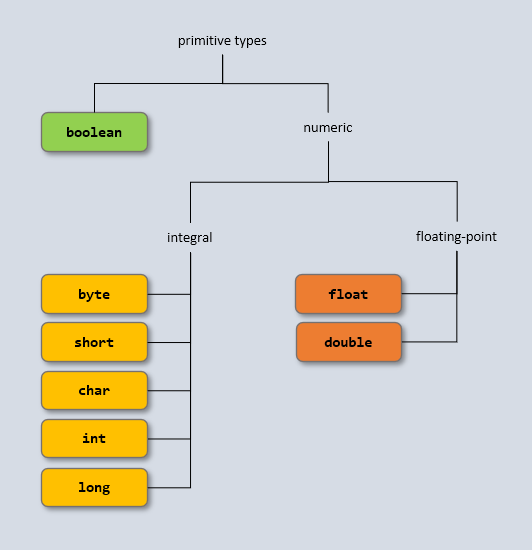
The non-integral types differ in both range and the number of decimal places. The two types for numbers with decimal points are known as floating-point types, because they represent real numbers in which the decimal point can shift to accommodate very large or very small magnitudes. A full and authoritative description of the primitive types can be found in the latest Java Language Specification.
2.3.2 Variables
A variable is a symbolic name for a memory location where a value is stored during program execution. High-level languages free us from having to manage physical memory, letting us focus on the meaning of values while the compiler and runtime system handle storage.
In Java, every variable has a type and must be declared before use. To declare a variable is to
specify its name and type. For example, to store an integer we first choose a name. An int
variable named x is declared like this:
int x;
This declaration tells the compiler to allocate memory for an int value, which can be accessed using
the name x. A variable can also be initialized when it is declared. For example, y is declared
and initialized to 3:
int y = 3;
The equals symbol (=) is the assignment operator, which copies the value on the right into
the memory location specified by the variable on the left. The statement y = 3 is read aloud as
y gets 3, not y equals 3, because it signifies an action rather than a comparison. In this
statement, 3 is called the initializer because it gives the variable its first value. Once a
value is assigned to a variable, it retains that value until explicitly changed.
Since primitive type names in Java are keywords, they cannot be used as identifiers — that is,
names of variables, methods, classes, or other language entities. So, for example, int is not a
valid variable name.
2.3.3 Static Typing
The word static has a number of different meanings in the context of programming, but generally it refers to something that is known or happens at compile time, as opposed to dynamic, which means at runtime. In a statically typed language such as Java, every variable must have a fixed type that is known to the compiler.
Some languages do not require variables to be typed. This freedom affords the programmer a degree of
flexibility but increases the potential for type errors — operations on a variable that are invalid
for its type. For example, assigning a floating-point value to an int variable is detected and
flagged by the Java compiler. Static typing improves type safety by preventing such errors and
by reducing opportunities to indirectly access protected areas of memory.
In language design, many choices involve a trade-off between flexibility and safety. Java consistently favors safety: by enforcing static typing and other constraints, it limits the freedom of the programmer to reduce errors and ensure predictable behavior at runtime.
2.3.4 The var Keyword
Introduced in Java 10, the var keyword allows the compiler to infer a variable’s type from its
initializer when possible. For example:
var greeting = "A star shines on the hour of our meeting.";
var count = 3;
Using var can enhance readability when type names are long, but the variable’s type is still fixed
at compile time. In this book, all code listings explicitly specify variable types. Doing so helps
beginners understand the connection between variables, their types, and the operations they support.
2.3.5 Arithmetic Operators
Java has five arithmetic operators: addition (+), subtraction (–), multiplication (*),
division (/), and remainder (%). The result of x / y depends on the operand types: if both are
integers, integer division produces the whole number of times y fits into x; if either is a
floating-point value, floating-point division produces the exact quotient. The remainder operator
(%) yields the portion of x that is left after subtracting as many multiples of y as possible.
These ideas are illustrated in Listing 2.3.4.
Listing 2.3.5 - ArithmeticDemo.java
package chap02.sect3;

public class ArithmeticDemo {

   public static void main(String[] args) {
      int x = 3;
      int y = 5;
      int z = (x + y) * (x - y);

      System.out.println(z);
      System.out.println(23 / 5);
      System.out.println(23 % 5);
   }
}
Output 2.3.5
-16
4
3
The variable z is initialized to the value of the expression (x + y) * (x - y), which is -16
since x and y are 3 and 5, respectively. The first output statement passes z (an int
variable) to println, not "z" (a string literal), so the output is -16 rather than the letter
z. There are versions of println for each primitive type.
This is an example of method overloading: an object can have multiple methods with the same
name if they differ in the type or number of their arguments. The println method is overloaded to
handle different argument types, allowing the same method name to be used for strings, integers, and
other primitives.
2.3.6 Choosing Variable Names
The rules for naming variables are somewhat technical, but in practice it suffices to say that a name may use letters and digits, must start with a letter, and cannot be a keyword. Beyond the rules, there are two widely accepted conventions for clarity:
- Descriptive names: Choose a name that indicates the variable’s purpose. For example, a variable
storing a player’s score might be named
scoreorpoints; calling itxornumberwould not be helpful. - Lower camel case: Compound variable (and method) names use capital letters to mark the
start of each word or word fragment, with the first word in lowercase. For example:
totalDistanceoruserName. By contrast, upper camel case, which capitalizes every word, is always used for class names, as inBankAccountorFlightSchedule.
These conventions make code easier to read: you can immediately recognize a variable or class name as such.